Change tracking
Change tracking
General Audience boundary
The General Audience build contains the generic change-tracking system but ships without built-in Alcohol and Pornography/compulsive-sexual-behavior profiles, without the SPAA section and without Twelve-Step or literature-prompt resources. General or custom change areas can still use counters, triggers, urges, resets and history.
When no change area is enabled, change tracking and its related inputs are hidden from the main navigation. General daily data remains intact.
Using counters
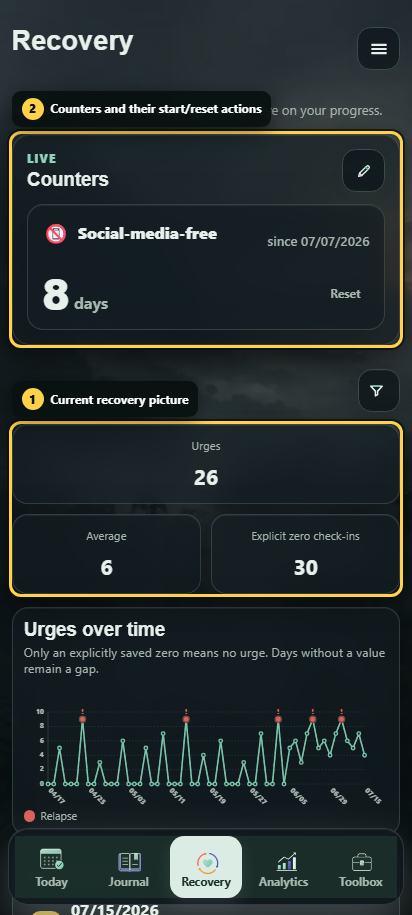
A counter shows the time since a defined start or reset time.
- A counter does not start automatically.
- Its start date can be adjusted manually.
- A reset is created only by a confirmed action or an urge stored as a relapse.
- Reset history is retained.
- A relapse can reset none, one or several counters.
The visible day count is calculated from stored timestamps instead of being saved as a new record every day.
Recording triggers and urges
A trigger describes a possible cue and can be recorded whether or not an urge occurred. An urge is stored separately with an intensity from 1 to 10.
- If you enter a previously hidden value again with the same name in an autocomplete field, the existing value becomes visible again. Letter case and whitespace at the beginning or end are ignored during comparison. Historical assignments remain intact and no duplicate is created.
- From intensity 4, reason, response and outcome appear as optional details. You can still save the urge immediately without them.
- The reason field offers only previous urge reasons as suggestions. A newly entered reason is stored locally for later entries; triggers remain separate.
- Possible outcomes include subsided, weaker, unchanged, stronger or relapse.
- A relapse can be stored together with selected counter resets.
A stored intensity of 0 is not an urge event. It represents a recovery check-in: no urge. A day without that check-in remains unknown.
Reading recovery history
Recovery history can be filtered by change area and time range. Below the counter cards, it summarizes urge events, average intensity and explicit zero check-ins for the selected period. The timeline shows maximum and average at the same time; the average is dashed. Relapses are marked there.
Events assigned to several change areas are not duplicated in the combined view.
More information about recovery, safety and Companion boundaries is available under Recovery, safety and Companion.
The change-tracking view combines the current picture, counters and history filtering in one place.